 973ac5f329
* Add Firefox 121+ to list of HEVC-supporting browsers

Mozilla implemented support for HEVC decoding using WMF on Windows. Support for HEVC playback is being tested anyway using the canPlayHevc() function, so this should be a safe change for other operating systems (or systems without hardware HEVC decoding) as well.

Fixes #5706

* Raise minimum Firefox version to 132 for HEVC playback

HEVC 10bit was broken before, but the support seems to be mores table now

* Raise minimum Firefox version to 134 for HEVC playback

Support is now officially supported as per version 134

Co-authored-by: gnattu <gnattu@users.noreply.github.com>

---------

Co-authored-by: gnattu <gnattu@users.noreply.github.com>
Jellyfin Web
Part of the Jellyfin Project








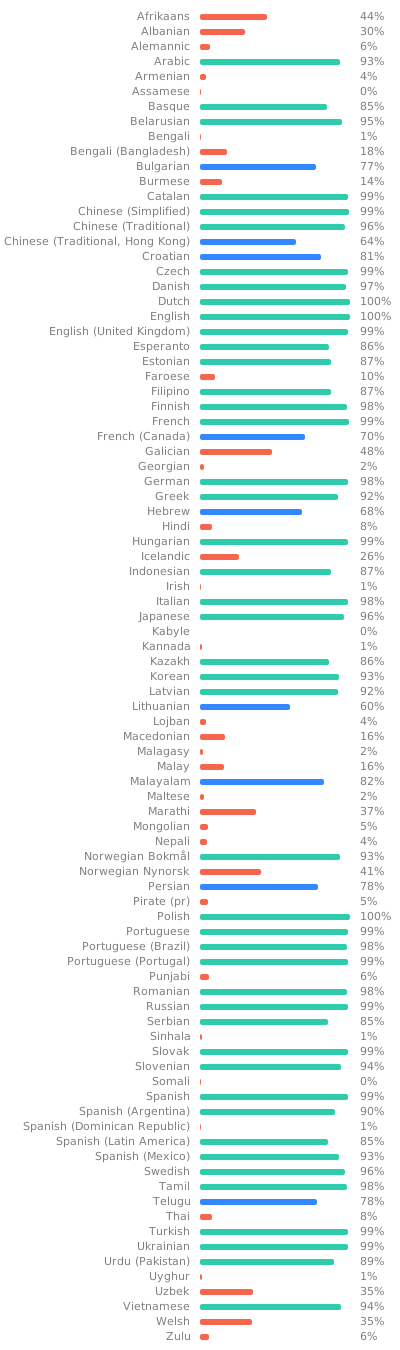
Jellyfin Web is the frontend used for most of the clients available for end users, such as desktop browsers, Android, and iOS. We welcome all contributions and pull requests! If you have a larger feature in mind please open an issue so we can discuss the implementation before you start. Translations can be improved very easily from our Weblate instance. Look through the following graphic to see if your native language could use some work!
Build Process
Dependencies
- Node.js
- npm (included in Node.js)
Getting Started
-
Clone or download this repository.
git clone https://github.com/jellyfin/jellyfin-web.git cd jellyfin-web -
Install build dependencies in the project directory.
npm install -
Run the web client with webpack for local development.
npm start -
Build the client with sourcemaps available.
npm run build:development
Directory Structure
Note
We are in the process of refactoring to a new structure based on Bulletproof React architecture guidelines. Most new code should be organized under the appropriate app directory unless it is common/shared.
.
└── src
    ├── apps
    │   ├── dashboard     # Admin dashboard app layout and routes
    │   ├── experimental  # New experimental app layout and routes
    │   └── stable        # Classic (stable) app layout and routes
    ├── assets            # Static assets
    ├── components        # Higher order visual components and React components
    ├── constants         # Common constant values
    ├── controllers       # Legacy page views and controllers 🧹 ❌
    ├── elements          # Basic webcomponents and React equivalents 🧹
    ├── hooks             # Custom React hooks
    ├── lib               # Reusable libraries
    │   ├── globalize     # Custom localization library
    │   ├── legacy        # Polyfills for legacy browsers
    │   ├── navdrawer     # Navigation drawer library for classic layout
    │   └── scroller      # Content scrolling library
    ├── plugins           # Client plugins
    ├── scripts           # Random assortment of visual components and utilities 🐉 ❌
    ├── strings           # Translation files (only commit changes to en-us.json)
    ├── styles            # Common app Sass stylesheets
    ├── themes            # CSS themes
    ├── types             # Common TypeScript interfaces/types
    └── utils             # Utility functions
- ❌ — Deprecated, do not create new files here
- 🧹 — Needs cleanup
- 🐉 — Serious mess (Here be dragons)