 2ff0a67e10
Rewrite so we don't need to constantly update with every new Fedora
release. This is especially useful when Fedora and Jellyfin release
cycles don't line up.

Version selection is as follows:
* TARGET environment variable, which is currently used already
* Currently running Fedora version
* Hardcoded Fallback version that can be updated occasionally
Jellyfin Web
Part of the Jellyfin Project








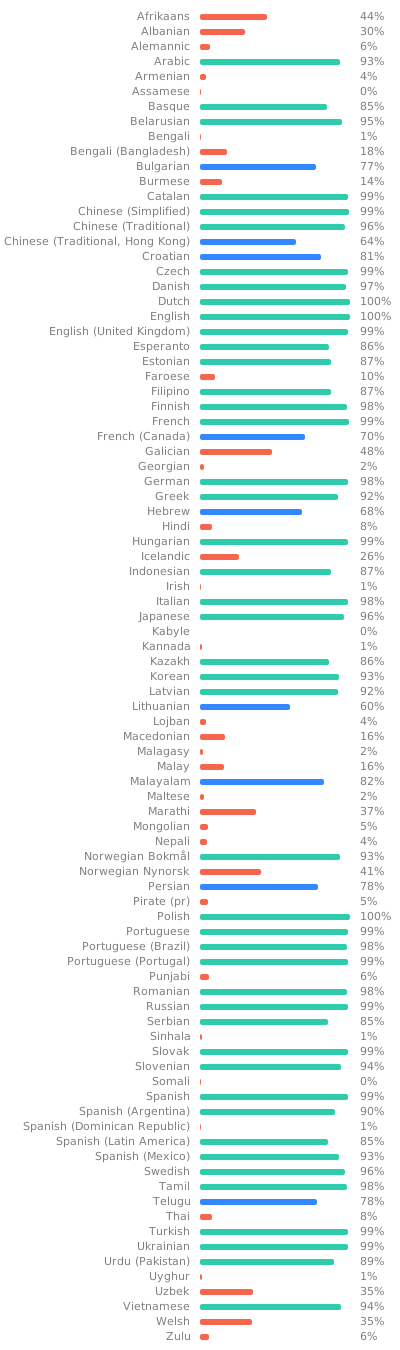
Jellyfin Web is the frontend used for most of the clients available for end users, such as desktop browsers, Android, and iOS. We welcome all contributions and pull requests! If you have a larger feature in mind please open an issue so we can discuss the implementation before you start. Translations can be improved very easily from our Weblate instance. Look through the following graphic to see if your native language could use some work!
Build Process
Dependencies
- Node.js
- npm (included in Node.js)
Getting Started
-
Clone or download this repository.
git clone https://github.com/jellyfin/jellyfin-web.git cd jellyfin-web -
Install build dependencies in the project directory.
npm install -
Run the web client with webpack for local development.
npm start -
Build the client with sourcemaps available.
npm run build:development